What is IoT networking?
Lecture 5 – IoT Networking Fundamentals
IoT networking fundamentals with IPv6, 6LoWPAN, Wi-Fi, LoRaWAN, and BLE protocols. Includes an ESP32 Wi-Fi connection lab for practical understanding.
Introduction
Networking is what connects the “things” in the Internet of Things (IoT). Without communication, sensors can’t send data, and devices can’t interact intelligently.
In this lecture, you’ll explore how IoT devices use different network protocols such as IPv6, 6LoWPAN, Wi-Fi, LoRaWAN, and BLE each designed to serve different use cases like short-range, low-power, or long-distance communication.
IoT Networking Basics
IoT networks link sensors, gateways, and cloud platforms together to enable real-time data exchange. The choice of networking technology depends on key factors such as:
- Power consumption
- Data rate (speed)
- Range
- Cost
- Scalability
These parameters determine which protocol is best for a particular IoT application.
IPv6 and 6LoWPAN
IPv6 in IoT
The Internet Protocol version 6 (IPv6) was created to overcome the address limitations of IPv4. With 128-bit addressing, IPv6 provides virtually infinite unique addresses essential for billions of IoT devices that need unique identifiers.
6LoWPAN (IPv6 over Low-Power Wireless Personal Area Networks)
6LoWPAN allows IPv6 packets to be sent over low-power, low-bandwidth networks like IEEE 802.15.4.
It uses header compression and fragmentation to make IPv6 practical for small, battery-powered devices.
Example: Smart agriculture sensors use 6LoWPAN to send soil moisture data over long distances with minimal energy use.
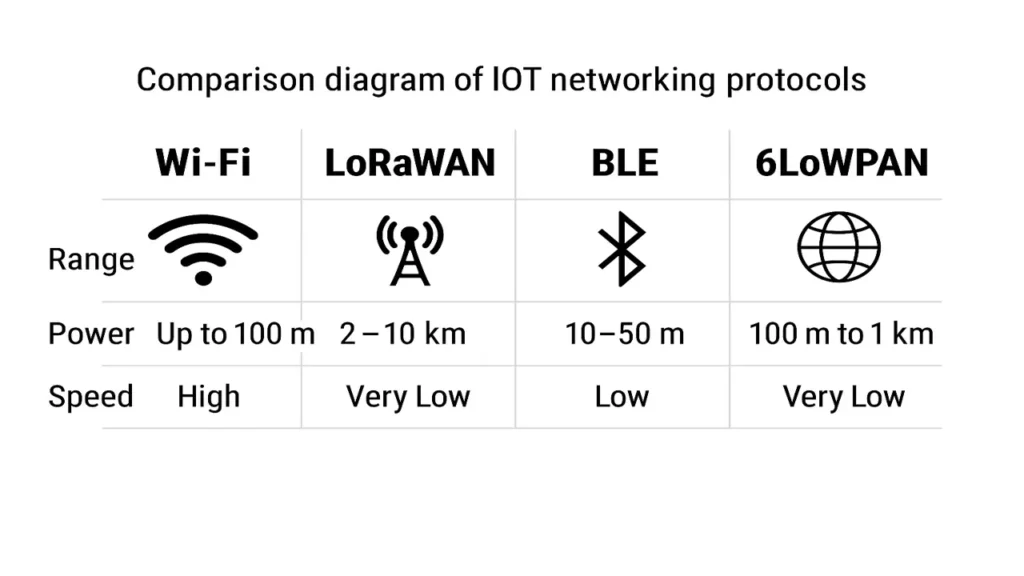
Comparison of IoT Network Protocols
| Protocol | Range | Power Use | Speed | Ideal For |
|---|---|---|---|---|
| Wi-Fi | Up to 100 m | High | Fast | Smart home, industrial IoT |
| LoRaWAN | 2–10 km | Very Low | Slow | Remote sensors, agriculture |
| BLE (Bluetooth Low Energy) | 10–50 m | Low | Medium | Wearables, health devices |
| 6LoWPAN | 100 m to 1 km | Very Low | Low | Low-power mesh networks |
| Ethernet | Wired | Moderate | Very Fast | Industrial automation |
Each technology offers a trade-off between range, data rate, and power consumption. IoT engineers must choose based on their use case for example, Wi-Fi for high-speed monitoring or LoRaWAN for long-range rural data collection.
How IoT Networks Communicate
IoT networks usually follow a layered approach:
- Device Layer – Sensors and actuators collect data.
- Network Layer – Transfers data using Wi-Fi, LoRaWAN, BLE, or 6LoWPAN.
- Gateway Layer – Aggregates and forwards data to the cloud.
- Application Layer – Displays information and analytics for users.
Data typically moves from sensors → gateway → cloud → dashboard.
Lab Exercise – ESP32 Wi-Fi Connection Demo
Objective
To demonstrate IoT network connectivity using an ESP32 microcontroller to connect to a local Wi-Fi network and transmit data.
Hardware
- ESP32 board
- Arduino IDE
- USB cable and PC with internet access
Procedure
Step 1 – Setup the Arduino IDE
- Install the ESP32 board manager in Arduino IDE.
- Select your ESP32 board and correct COM port.
Step 2 – Write the Code
#include <WiFi.h>

const char* ssid = "YourWiFiName";
const char* password = "YourWiFiPassword";

void setup() {
  Serial.begin(115200);
  WiFi.begin(ssid, password);
  Serial.print("Connecting to Wi-Fi");

  while (WiFi.status() != WL_CONNECTED) {
    delay(500);
    Serial.print(".");
  }

  Serial.println("\nConnected!");
  Serial.print("IP Address: ");
  Serial.println(WiFi.localIP());
}

void loop() {
  // Future: send sensor data or ping server
}
Step 3 – Upload & Test
- Upload the code to your ESP32.
- Open the Serial Monitor.
- Watch for successful Wi-Fi connection and assigned IP address.
Expected Output:
Connecting to Wi-Fi...
Connected!
IP Address: 192.168.1.102
Step 4 – Discussion
This lab shows how IoT devices like ESP32 connect through Wi-Fi (TCP/IP stack) to form the foundation of IoT communication.
In future labs, you’ll send sensor data to cloud platforms or MQTT brokers over this connection.
The approach followed at E Lectures reflects both academic depth and easy-to-understand explanations.
Summary
After completing this lecture, you will be able to:
- Explain IPv6 addressing and 6LoWPAN compression.
- Compare Wi-Fi, LoRaWAN, BLE, and 6LoWPAN for IoT networks.
- Establish Wi-Fi communication using ESP32.
- Understand how IoT devices interact through layered network models.
People also ask:
IoT networking refers to how smart devices connect and communicate with each other and the internet. It includes wired and wireless technologies that allow sensors, controllers, and cloud platforms to exchange data.
IPv6 provides a huge number of unique IP addresses, which is essential for IoT because millions of devices need to be individually identified online. IPv4 doesn’t have enough addresses to support large-scale IoT systems.
6LoWPAN (IPv6 over Low-Power Wireless Personal Area Networks) allows IoT devices with limited power and memory (like sensors) to use IPv6 efficiently. It compresses IPv6 packets so they can be sent over low-power networks like IEEE 802.15.4.
| Protocol | Range | Power Use | Speed | Best For |
|---|---|---|---|---|
| Wi-Fi | Short (up to 100 m) | High | Fast | Smart homes, streaming data |
| LoRaWAN | Long (2–10 km) | Very Low | Slow | Remote sensors, agriculture |
| BLE (Bluetooth Low Energy) | Medium (up to 50 m) | Low | Moderate | Wearables, mobile IoT devices |
LoRaWAN is ideal for connecting IoT devices over long distances with minimal power usage. It’s commonly used in smart cities, environmental monitoring, and agricultural systems.