What’s the difference between Nginx and Apache?
Web Servers Basic Operations Nginx & Apache, Virtual Hosts, Reverse Proxy, Logs, TLS
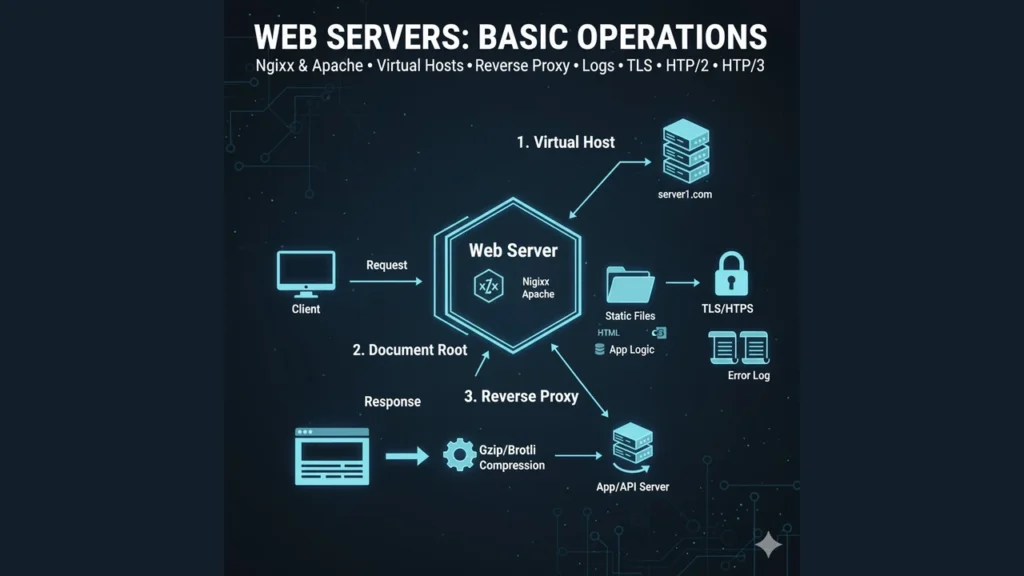
Web servers basics: request lifecycle, virtual hosts, DocumentRoot, static vs dynamic, reverse proxy, logs, TLS, compression, and quick troubleshooting.
What a Web Server Does
- Listens on 80/443 for HTTP/HTTPS.
- Static content: returns files from DocumentRoot with the right MIME type.
- Dynamic content: proxies to an application process (e.g., Node, Gunicorn/UWSGI, PHP-FPM).
- Implements redirects, security headers, caching, compression, and logging.
Request Lifecycle (Server View)
- TCP/TLS connection established on 80/443.
- Server matches the Host header to a virtual host.
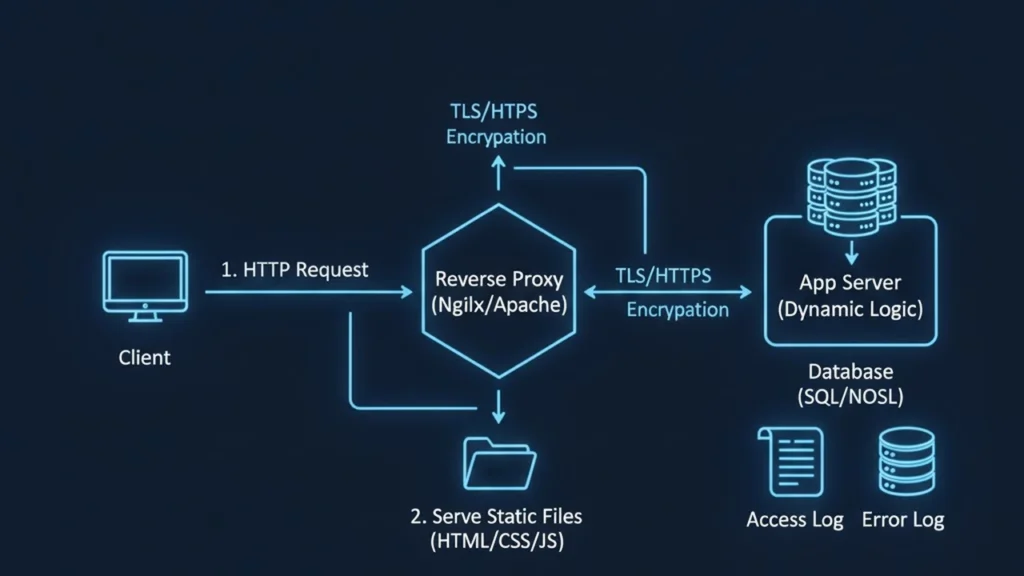
- If the path points to a static file, serve it with headers.
- Else, route via reverse proxy to the app, receive response, and return to client.
- Write access/error logs; apply gzip/brotli, caching, and security headers.
Core Concepts
- DocumentRoot: Folder that maps URL paths to files (e.g.,
/var/www/example.com/public). - Index files:
index.html(orindex.php) sent for a directory request. - MIME types:
Content-Type: text/html,image/webp, etc. - Directory listing: Off by default in production; enable only if needed.
Virtual Hosts (Server Blocks)
Host multiple sites on one server using SNI + Host header. Each host has its own root, logs, and TLS config.
Static vs Dynamic (Reverse Proxy)
- Static: images, CSS, JS, docs.
- Dynamic: API routes, server-rendered pages.
- Use
proxy_pass(Nginx) orProxyPass(Apache) to forward to application servers (localhost:3000,unix:/run/php/php-fpm.sock,127.0.0.1:8000, etc.).
Logs
- Access log: one line per request (method, path, status, bytes, referer, user-agent, request time).
- Error log: startup errors, config issues, upstream timeouts, TLS problems.
Quick reads:
# See live traffic
sudo tail -f /var/log/nginx/access.log
sudo tail -f /var/log/apache2/access.log

# Find slow responses (Nginx if $request_time logged)
grep -E ' [45][0-9]{2} ' /var/log/nginx/access.log | tail -n 50
HTTPS/TLS
- Store private keys securely; use proper cert chain.
- Force HTTPS with 301 redirect and enable HSTS.
- Renew certificates (e.g., Certbot) and monitor expiry.
- Prefer modern protocols/ciphers; enable HTTP/2, and HTTP/3 if available.
Compression & Caching
- Enable gzip (and brotli if supported) for text assets.
- Set Cache-Control and ETag for static files; use long TTL for versioned assets.
- Respect
Varyheaders (e.g.,Accept-Encoding).
Quick Starts
Nginx (server block + reverse proxy)
server {
  listen 80;
  server_name example.com www.example.com;

  root /var/www/example.com/public;
  index index.html;

  location /assets/ {
    # long cache for versioned assets
    expires 30d;
    add_header Cache-Control "public, max-age=2592000, immutable";
  }

  location / {
    try_files $uri @app;   # serve static if exists
  }

  location @app {
    proxy_set_header Host $host;
    proxy_set_header X-Real-IP $remote_addr;
    proxy_pass http://127.0.0.1:3000;
  }

  access_log /var/log/nginx/example.access.log;
  error_log  /var/log/nginx/example.error.log warn;
}
Service basics:
sudo systemctl enable nginx
sudo systemctl restart nginx
sudo nginx -t   # validate config
Apache HTTP Server (vhost + proxy)
<VirtualHost *:80>
  ServerName example.com
  ServerAlias www.example.com
  DocumentRoot /var/www/example.com/public
  DirectoryIndex index.html

  # Static cache
  <Location "/assets/">
    Header set Cache-Control "public, max-age=2592000, immutable"
  </Location>

  # Reverse proxy to app
  ProxyPreserveHost On
  ProxyPass        "/" "http://127.0.0.1:3000/"
  ProxyPassReverse "/" "http://127.0.0.1:3000/"

  ErrorLog  ${APACHE_LOG_DIR}/example.error.log
  CustomLog ${APACHE_LOG_DIR}/example.access.log combined
</VirtualHost>
Modules & service:
sudo a2enmod proxy proxy_http headers
sudo systemctl enable apache2
sudo systemctl restart apache2
sudo apachectl configtest
Hands-On Mini Lab
- Create
/var/www/demo/public/index.htmlwith a hello page. - Configure Nginx or Apache vhost pointing to that root.
- Add a simple Node/Flask/PHP-FPM app on
localhost:3000and configure reverse proxy. - Enable gzip and set
Cache-Controlon/assets. - Visit the site, then check access and error logs; note status codes and response times.
Troubleshooting Cheatsheet
- 403 Forbidden: wrong file owner/perms; web user can’t read directory; SELinux/AppArmor.
- 404 Not Found: bad root or missing
try_files/FallbackResource. - 502/504 Gateway: app crashed, wrong upstream address/socket, or timeout too low.
- Redirect loops: duplicate HTTP→HTTPS rules or app-level redirects.
- Certificate “incomplete chain”: serve full chain; update intermediate CA.
- Large file downloads fail: adjust
client_max_body_size(Nginx) orLimitRequestBody(Apache).
The approach followed at E Lectures reflects both academic depth and easy-to-understand explanations.
Summary
- Organize sites with virtual hosts.
- Serve static directly; send dynamic to an app server via reverse proxy.
- Watch access/error logs; they tell you nearly everything.
- Ship HTTPS with proper cert chains and HSTS.
- Boost performance with caching and compression.
People also ask:
Nginx is event-driven and excels at static files and proxying; Apache is module-rich with flexible per-directory config (.htaccess). Both are production-proven.
Usually yes. The proxy terminates TLS, handles gzip/caching, static assets, and forwards only dynamic routes to the app.
Inside the DocumentRoot, e.g., /var/www/example.com/public. Keep app code and secrets outside the public root.
Add a port-80 vhost that 301-redirects to https://, install a valid cert, and enable HSTS.
Start with the error log for stack traces and timeouts, then the access log to confirm traffic, status codes, and latency.