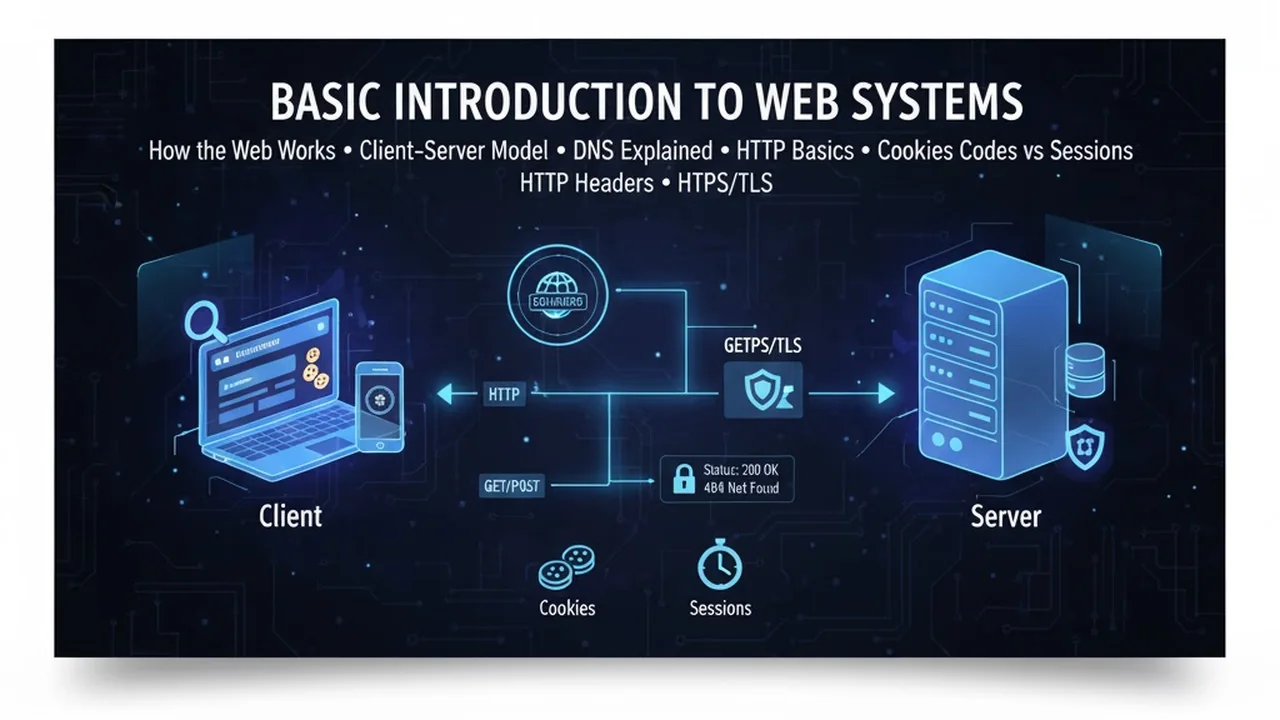
Introduction to web systems: client–server, DNS, HTTP/HTTPS, status codes, and cookies vs sessions with a clear concept diagram.
What Is a Web System?
A web system is the full pathway that turns a URL into pixels on your screen. It includes:
- Client: Your browser and device
- Network: DNS, routing, TLS/HTTPS
- Server: Web server (Nginx/Apache/Node), application logic, and databases
- Delivery: Caching layers and CDNs
Understanding this chain helps you debug faster, design better, and communicate your decisions clearly core skills for any web technologist.
Internet vs the Web
- Internet: Global infrastructure moving packets using IP across routers and links.
- Web: An application on top of the Internet that uses HTTP/HTTPS to deliver HTML, CSS, JavaScript, images, and APIs.
Exam tip: The web is not the Internet. It’s one of many Internet applications (others include email, SSH, FTP, etc.).
The Client–Server Model in Practice
- Client (browser): Sends requests, parses HTML/CSS/JS, renders UI.
- Server: Listens on ports (80/443), routes requests to app logic, accesses databases, returns responses.
- Statelessness: HTTP itself is stateless; continuous user experience is created using cookies, sessions, or tokens.
Common Ports
80→ HTTP (unencrypted)443→ HTTPS (encrypted with TLS)
What Happens When You Type a URL (Step-by-Step)
- Parse the URL: Browser extracts scheme (
https), host, port, path, and query. - DNS Lookup: The browser or OS resolver asks DNS for the IP address of the host.
- TCP Handshake: Client and server perform a three-way handshake to open a reliable channel.
- TLS Handshake (HTTPS): They agree on ciphers, verify the certificate, and set up encryption.
- HTTP Request: Browser sends a request line, headers, and (optionally) a body.
- Server Processing: Web server routes to application code which may query a database.
- HTTP Response: Server returns status, headers (e.g.,
Content-Type,Cache-Control) and the body (HTML or JSON). - Rendering: Browser builds the DOM, CSSOM, combines into a render tree, lays out, and paints.

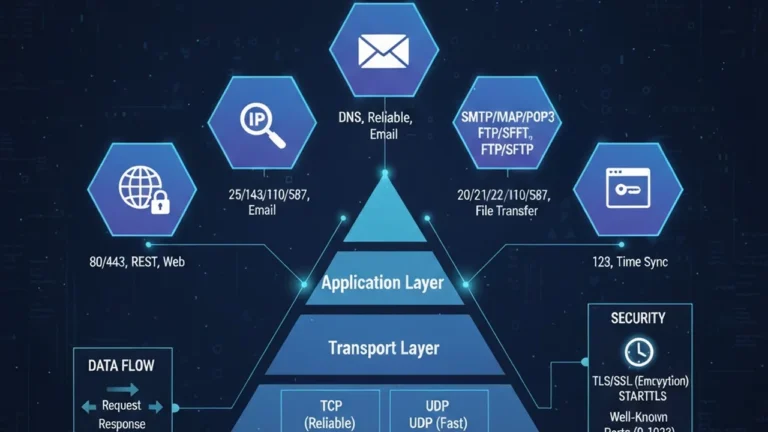
Applications and TCP/IP Layers, Ports, TCP vs UDP, IP & Routing Basics
Understanding HTTP/HTTPS
5.1 Request & Response Formats
Request (example)
GET /index.html HTTP/1.1
Host: example.com
Accept: text/html
Accept-Language: en
Cookie: sessionId=abc123
Response (example)
HTTP/1.1 200 OK
Content-Type: text/html; charset=utf-8
Cache-Control: max-age=3600, public
ETag: "v2-8af1"
Set-Cookie: sessionId=abc123; HttpOnly; Secure; SameSite=Lax
Methods (and Safety/Idempotence)
| Method | Safe? | Idempotent? | Typical Use |
|---|---|---|---|
| GET | ✅ | ✅ | Retrieve a resource |
| HEAD | ✅ | ✅ | Metadata only (no body) |
| POST | ❌ | ❌ | Create, submit forms, RPC |
| PUT | ❌ | ✅ | Replace resource |
| PATCH | ❌ | ❌ | Partial update |
| DELETE | ❌ | ✅ | Remove resource |
| OPTIONS | ✅ | ✅ | Capabilities & CORS preflight |
Idempotent means repeating the request yields the same result on the server.
HTTP/1.1 vs HTTP/2 vs HTTP/3 (quick view)
- HTTP/1.1: One request per TCP connection (keep-alive helps).
- HTTP/2: Multiplexes many streams over one connection; header compression.
- HTTP/3: Uses QUIC over UDP for faster, more resilient connections.
Status Codes: The 5 Families
- 1xx Informational: 100 Continue
- 2xx Success: 200 OK, 201 Created
- 3xx Redirection: 301 Moved Permanently, 302 Found, 304 Not Modified
- 4xx Client Errors: 400 Bad Request, 401 Unauthorized, 403 Forbidden, 404 Not Found
- 5xx Server Errors: 500 Internal Server Error, 502 Bad Gateway, 503 Service Unavailable
Debug tip: A 304 means your cache is valid great for performance.
HTTP Headers You’ll Use Daily
- General:
Date,Connection - Request:
Host,User-Agent,Accept,Accept-Language,Authorization,Cookie - Response:
Content-Type,Content-Length,Location(for redirects),
Caching:Cache-Control,Expires,ETag,Last-Modified
Security:Strict-Transport-Security,Content-Security-Policy,X-Content-Type-Options
Sample caching set (immutable assets):
Cache-Control: public, max-age=31536000, immutable
ETag: "asset-7d3c"
Sample caching set (HTML pages):
Cache-Control: public, max-age=60, stale-while-revalidate=30
ETag: "page-12"
Cookies vs Sessions (and Modern Token Options)
Cookies
Small key–value pairs stored by the browser and sent with matching requests.
- Secure: send over HTTPS only
- HttpOnly: not accessible to JavaScript (helps against XSS)
- SameSite (Lax/Strict/None): controls cross-site sending (helps against CSRF)
Sessions
Server-side state linked to a session ID stored in a cookie (e.g., sessionId=...). Great for classic web apps.
Tokens (JWT/OAuth)
Some modern systems use JWT or other tokens in headers (e.g., Authorization: Bearer …). This can reduce server-side session storage but requires careful handling (expiration, revocation).
Performance 101: Caching, ETags & CDNs
- Browser cache: Reuses files locally when allowed by headers.
- Validation:
ETagorLast-Modifiedlets the browser check freshness cheaply. - CDN: Replicates content geographically closer to users, reduces latency, and absorbs traffic spikes.
- Compression: Use gzip/brotli to shrink responses.
- Images: Choose modern formats (WebP/AVIF) and correct sizes; lazy-load off-screen images.
Inside the Browser: Critical Rendering Path
- HTML → DOM
- CSS → CSSOM
- Render tree = DOM + CSSOM
- Layout (size/position)
- Paint (pixels to screen)
Blocking pitfalls: render-blocking CSS, synchronous JS, and huge images. Use defer/async, code-splitting, and responsive images (srcset, sizes).
Tools for Developers & Students
- DevTools (Chrome/Firefox): Network timeline, performance, coverage
- curl / HTTPie / Postman: Craft and inspect requests
- Wireshark: Deep packet inspection (for labs)
- Local servers:
python -m http.server, Node + Vite - Validation: W3C HTML/CSS validators; Lighthouse for performance/SEO
Troubleshooting Checklist
- DNS issues?
nslookup/digdomain → verify IP and TTL - TLS problems? Certificate valid? Correct hostname (SNI)? Mixed content blocked?
- 404/500s? Check server logs and routing; confirm file paths and permissions
- Slow page? Run Lighthouse: large images, blocking CSS/JS, no caching?
- CORS errors? Verify
Access-Control-Allow-Originand preflight (OPTIONS) responses
Mini Hands-On Lab
- Open DevTools → Network, reload, filter by Doc. Read status, headers, and timings.
- Terminal:
curl -I https://example.comand identify caching headers. - Serve a local folder:
- Python:
python -m http.server 8080 - Node:
npx http-server . -p 8080
- Python:
- Change a file and see how
ETagor timestamps affect 304 vs 200. - Optional: In Postman, send a request with a custom
Accept-Languageand observe content negotiation if supported.
The approach followed at E Lectures reflects both academic depth and easy-to-understand explanations.
Summary
- A web system spans client, network, server, and delivery layers.
- DNS maps domains to IPs; TLS/HTTPS secures communication.
- HTTP is stateless use cookies/sessions/tokens for continuity.
- Master status codes and headers to debug quickly.
- Caching, CDNs, and render-path optimizations are the easiest wins for performance.
People also ask:
It’s the entire route from your browser to a server and back DNS finds the server, TCP/TLS connects securely, HTTP exchanges messages, and the browser renders the result.
Because the semantics (methods, status codes, headers) come from HTTP/1.1. Newer versions change transport efficiency, not the basic rules.
Yes. HTTPS protects privacy, prevents tampering, and is required for modern features (Service Workers, geolocation, etc.).
Cookies live in the browser; sessions live on the server (or are represented by tokens) and use a cookie/header to identify the user between requests.
200, 301/302, 304, 400/401/403, 404, 500/502/503.