Computer Networks Basics: define network, host, NIC; bandwidth vs throughput vs latency; circuit vs packet switching; packet journey with quick tasks. Lab.
What is a Network?
A computer network is a collection of interconnected devices that share data using agreed communication rules (protocols). Networks range from two laptops at home to the global Internet. Good networks deliver data reliably, efficiently, and with predictable delay.
Example: Your phone (host) sends a message through Wi-Fi (LAN) to your router, then to your ISP and onward to the destination server on the Internet.
Host (End System)
A host (or end system) is any device that runs applications and connects to a network: laptops, phones, servers, printers, even IoT sensors. Hosts originate and consume data.
Remember: When users say “computer,” networking folks often mean “host.”
NIC (Network Interface Card)
A NIC is the hardware interface that connects a host to the network (wired Ethernet or wireless 802.11). Each NIC has a unique MAC address burned in by the manufacturer, used for local (link-layer) delivery.
Tip: A laptop with both Wi-Fi and Ethernet has two NICs and two MAC addresses.
Bandwidth vs Throughput vs Latency
| Term | Short Definition | Think Of It As | Quick Example |
|---|---|---|---|
| Bandwidth | Maximum capacity of a link (bits per second). | Pipe size (theoretical max). | “Up to 100 Mbps” ISP plan. |
| Throughput | Actual achieved data rate. | Water actually flowing. | Speed test showing 72 Mbps. |
| Latency | Time a bit takes end-to-end (delay). | Travel time. | 25 ms to your game server. |
Key insights
- Throughput is usually less than bandwidth due to overhead, sharing, and congestion.
- Low latency matters for real-time tasks: voice calls, gaming, live trading.
- A high-bandwidth/high-latency link can still feel “slow” for interactive apps.
Lecture- 1: Core Concepts of Automata: Alphabets, Strings, Languages, and Proof Basics
Circuit Switching vs Packet Switching
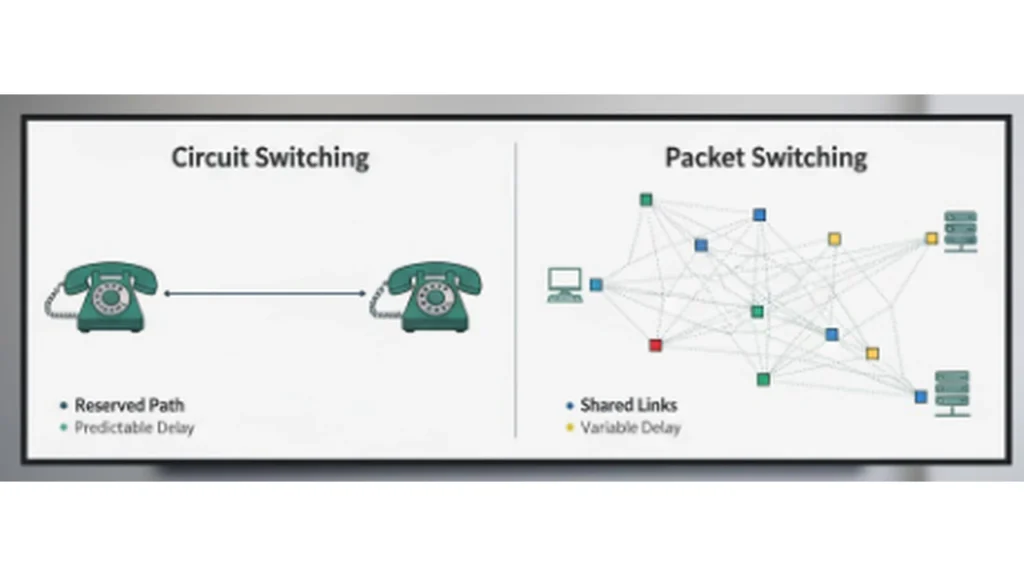
Circuit Switching
- Idea: Reserve a dedicated end-to-end path before sending data.
- Pros: Predictable bandwidth and delay once established.
- Cons: Wastes capacity when idle; poor statistical sharing.
- Classic example: Traditional telephone networks.
Packet Switching (how the Internet works)
- Idea: Break data into small packets that share links dynamically.
- Pros: Efficient use of links, scalable, resilient to failures.
- Cons: Variable delay (jitter) and occasional loss; needs smart protocols.
- Modern example: Web, video streaming, VoIP over IP networks.
Compare in one line: Circuit switching guarantees a lane; packet switching lets everyone time-share the highway efficiently.
Quick Tasks
- Check your addresses
- Windows:
ipconfig• Linux/macOS:ip addr
Note IPv4, subnet mask/prefix, default gateway, MAC address.
- Measure reachability and delay
ping 8.8.8.8(observe average latency).ping your-gateway(compare local vs Internet delay).
- Observe throughput
- Run any reputable speed test once (log download/upload throughput vs your plan’s bandwidth).
The approach followed at E Lectures reflects both academic depth and easy-to-understand explanations.
Key Takeaways
- Network: the interconnected system; host: the device using it; NIC: the host’s door to the network.
- Bandwidth (capacity) is not throughput (achieved rate), and both are different from latency (delay).
- The Internet is packet-switched for efficiency and scalability; circuit switching prioritizes guaranteed paths.
People also ask:
A host is any networked device; a server is a role a host can play when it offers services (web, DNS, file).
Protocol overhead, Wi-Fi interference, shared links, and congestion reduce the achieved data rate.
It depends. Interactive tasks need low latency; bulk transfers care more about sustained throughput.
Core Internet transport is packet-switched. Dedicated leased lines can emulate circuit-like behavior, but packets still carry most traffic.
It implements data link and physical layer functions for the host: framing, MAC addressing, and signal transmission.