Programming Paradigms
Learn the fundamentals of Programming Paradigms understand the difference between procedural and object-oriented programming, explore real-world examples, and master the basics of variables, data types, and control structures to build a strong foundation in modern software development.
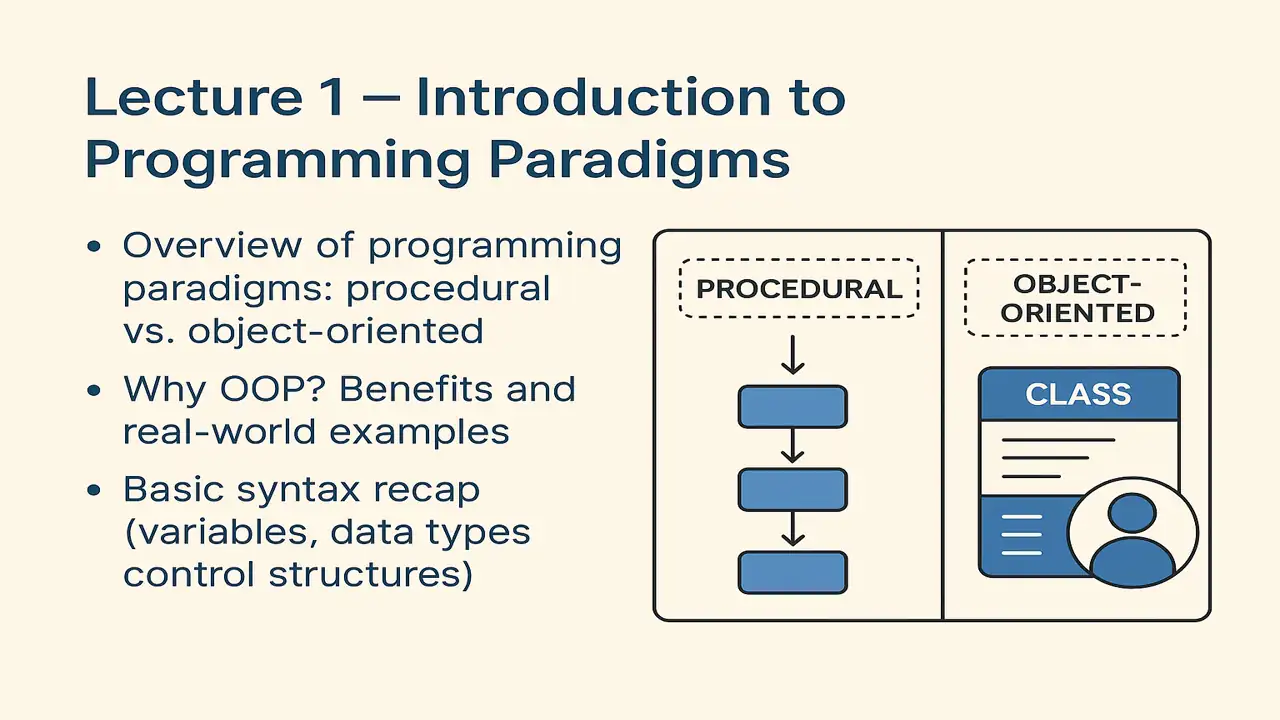
What is a Programming Paradigm?
A programming paradigm is a style or way of writing programs.
It defines how we think about problems and how we organize our code to solve them.
There are different paradigms, but the two most common are:
- Procedural Programming
- Object-Oriented Programming (OOP)
Procedural Programming
In procedural programming, the focus is on functions or procedures step-by-step instructions that tell the computer what to do.
You write code as a sequence of actions:
- Get input
- Process it
- Produce output
The data and the functions that operate on that data are separate.
Example (C++)
#include <iostream>
using namespace std;

int addNumbers(int a, int b) {
    return a + b;
}

int main() {
    int x = 5, y = 10;
    int sum = addNumbers(x, y);
    cout << "Sum is: " << sum << endl;
    return 0;
}
Here, everything is based on functions.
Data (x, y) and logic (addNumbers) are independent.
Drawback:
As projects grow, managing hundreds of functions and variables becomes confusing.
No clear way to connect data and behavior of real-world entities.
Object-Oriented Programming (OOP)
OOP solves this problem by organizing everything around objects which combine data and behavior. Each object represents something real (like a car, student, or account) and knows how to act.
Key Pillars of OOP:
- Encapsulation – Bundle data and methods together.
- Inheritance – Reuse properties and methods of existing classes.
- Polymorphism – Same action behaves differently based on the object type.
- Abstraction – Show only the necessary details, hide the rest.
Understanding the C++ Programming Environment: A Step-by-Step Guide
Why OOP? (Advantages)
| Procedural | Object-Oriented |
|---|---|
| Focus on actions | Focus on objects |
| Data & logic separate | Data + logic together |
| Hard to scale | Easy to maintain & extend |
| Code repetition | Code reuse via inheritance |
| Example: calculator program | Example: banking system, game, website backend |
Real-World Example
Imagine you’re designing a Bank System.
Procedural Way:
You’ll create functions:
deposit();
withdraw();
checkBalance();
You’ll also manage variables like accountNumber, balance, name, etc.
All scattered and independent.
OOP Way:
You’ll create a class:
class BankAccount {
public:
    string name;
    double balance;

    void deposit(double amount) {
        balance += amount;
    }
    void withdraw(double amount) {
        balance -= amount;
    }
};
Now, every object (account) can:
- store its own data
- perform its own actions
int main() {
    BankAccount acc1;
    acc1.name = "Ali";
    acc1.balance = 1000;
    acc1.deposit(500);
    cout << acc1.name << " has $" << acc1.balance;
}
Data and logic live together → like in real life.
Basic Syntax Recap
Before diving deep into OOP, students must recall fundamental syntax used in both C++ and Java.
Variables:
int age = 20;
float price = 10.5;
string name = "Ali";
Data Types:
| Type | Description | Example |
|---|---|---|
| int | Whole numbers | 10 |
| float/double | Decimal numbers | 3.14 |
| char | Single character | ‘A’ |
| string | Sequence of characters | “Hello” |
| bool | True/False | true |
Control Structures:
If-Else:
if (age >= 18) {
    cout << "You are an adult";
} else {
    cout << "You are a minor";
}
Loops:
for (int i = 0; i < 5; i++) {
    cout << i << " ";
}
While:
int n = 1;
while (n <= 3) {
    cout << n << " ";
    n++;
}
Summary of Lecture 1
| Concept | Meaning | Example |
|---|---|---|
| Programming Paradigm | Way of thinking/writing code | Procedural vs. OOP |
| Procedural | Focus on functions | addNumbers(a,b) |
| OOP | Focus on objects | BankAccount.deposit() |
| Advantage | Real-world modeling, reusability | Classes and objects |
| Syntax Recap | Data types, variables, loops | int, for, if |
Positive Thought for Students:
“Every great programmer was once a beginner who refused to give up. Keep learning, keep experimenting because every line of code you write brings you one step closer to mastery.”