

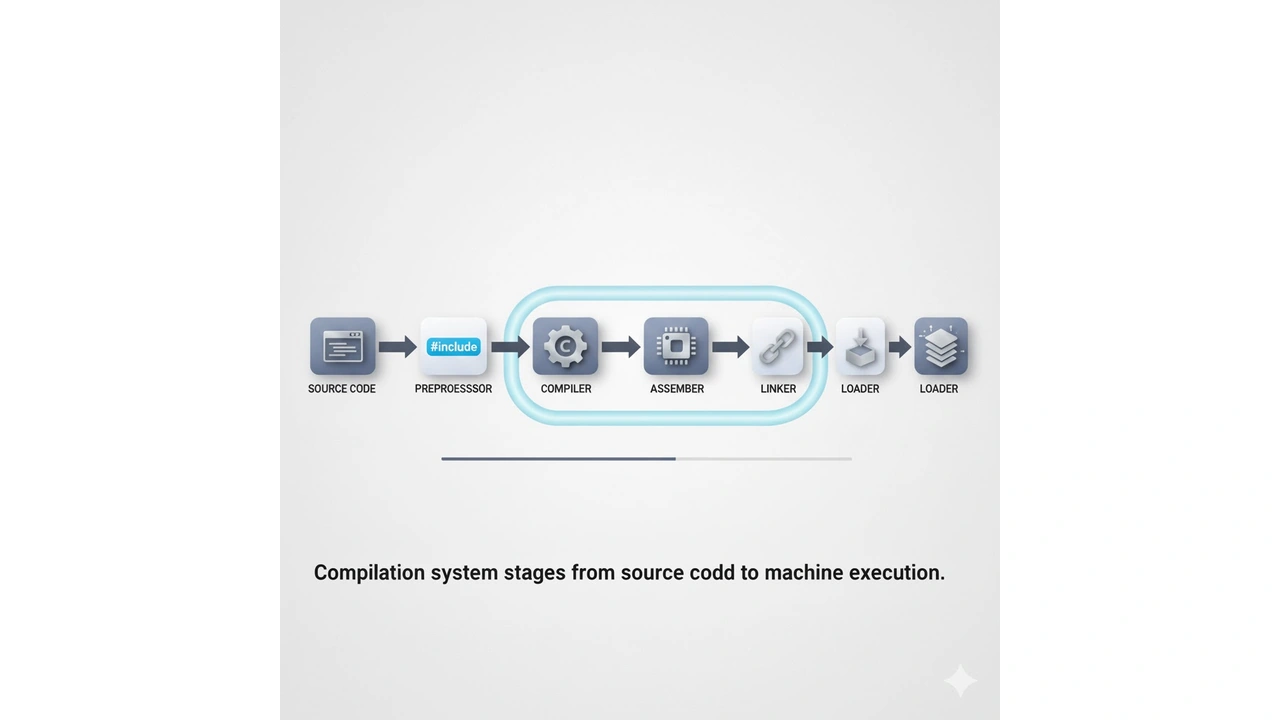
Compilation System: understand how source code becomes machine code via preprocessing, compiling, assembling, linking, and loading.
What is a Computer System?
A computer system combines hardware (CPU, main memory, storage, I/O devices, buses) and software (OS, compilers, libraries, applications).
- CPU (Processor): executes instructions, houses ALU (arithmetic/logic), registers, and control unit.
- Main Memory (RAM): byte-addressable, temporary working area for programs and data.
- Storage: persistent data (SSD/HDD).
- I/O Devices: keyboard, display, network, etc.
- System Bus/Interconnect: moves data and instructions among components.
- Operating System: resource manager and abstractor (processes, virtual memory, files, networking).
Mental picture: Source code → executable → CPU fetch-decode-execute on data in memory; OS orchestrates everything.
From Source to Running Program The Compilation System
When you type ./a.out, a lot has already happened.
- Preprocessing (
.c→.i): expands#include,#define, conditionals. - Compilation (
.i→.s): converts C/Java/… into assembly for a target ISA (e.g., x86-64, MIPS). - Assembly (
.s→.o): translates mnemonics into machine code + relocatable symbols. - Linking (
.o+ libraries → executable): resolves external references, produces a single binary. - Loading/Execution: OS loader maps the binary to memory; CPU starts at program entry (e.g.,
_start→main).
Common issues & fixes
- Undefined reference at link time: missing library or wrong order.
- ABI/arch mismatch: compile flags/bitness don’t match (e.g., 32- vs 64-bit).
- Runtime crashes: pointer misuse, stack corruption, integer overflow.
Hands-on (Linux/Mac):
# Build, view assembly, and disassemble
gcc -O2 hello.c -o hello
gcc -O2 -S hello.c -o hello.s
objdump -d hello | less
Bits, Bytes, Words
- Bit: 0 or 1.
- Nibble: 4 bits.
- Byte: 8 bits (smallest addressable unit in most systems).
- Word: native register size (e.g., 32 or 64 bits).
- Hexadecimal: compact base-16 for binary (4 bits = 1 hex digit).
Addressability: RAM is byte-addressable. Address 0x1000 points to a byte; multibyte integers occupy consecutive bytes.
Integers: Signed vs Unsigned
- Unsigned (n bits): range
0 … 2^n − 1. - Two’s Complement Signed (n bits): range
−2^(n−1) … 2^(n−1) − 1.- Negation: invert bits and add 1.
- Example (8-bit):
+5 = 0000 0101,−5 = 1111 1011.
Sign Extension: widening a signed value must replicate the sign bit. Mistakes here cause dramatic bugs in assembly.
Overflow
- Unsigned: wrap modulo
2^n. - Signed: result exceeds representable range; status flags set (e.g., OF in x86).
- Example (8-bit signed):
120 + 20 = 140→ overflows (max is 127).
Conversions You’ll Use in Assembly
- Binary → Hex: group in 4s:
1011 1100 = 0xBC. - Hex → Binary: expand each hex nibble to 4 bits:
0x7F = 0111 1111. - Decimal → Two’s Complement (n bits): write positive in binary, then two’s-complement if negative; clip/pad to
n.
Practice
- 8-bit unsigned range?
- 8-bit signed range?
- Two’s-complement of
0b0001 0110(22) is0b1110 1010(−22).
Where Assembly Meets C
Small C snippet:
int add(int a, int b){ return a + b; }
int main(){ return add(2, 3); }
Expect to see assembly using registers to pass/return values (ABI-dependent), an add instruction, and a process exit status via main’s return.
Typical Pitfalls (Common Mistakes)
- Integer overflow in loop counters/array indexes → use wider types, add assertions/tests.
- Signed/unsigned mix-ups → explicit casts, consistent types.
- Alignment assumptions → respect ABI; use
sizeofnot magic numbers. - Relocation/link errors → compile each TU, link with correct library order.
- Undefined behavior in C → avoid shifting negatives, out-of-bounds pointers.
Mini-Lab
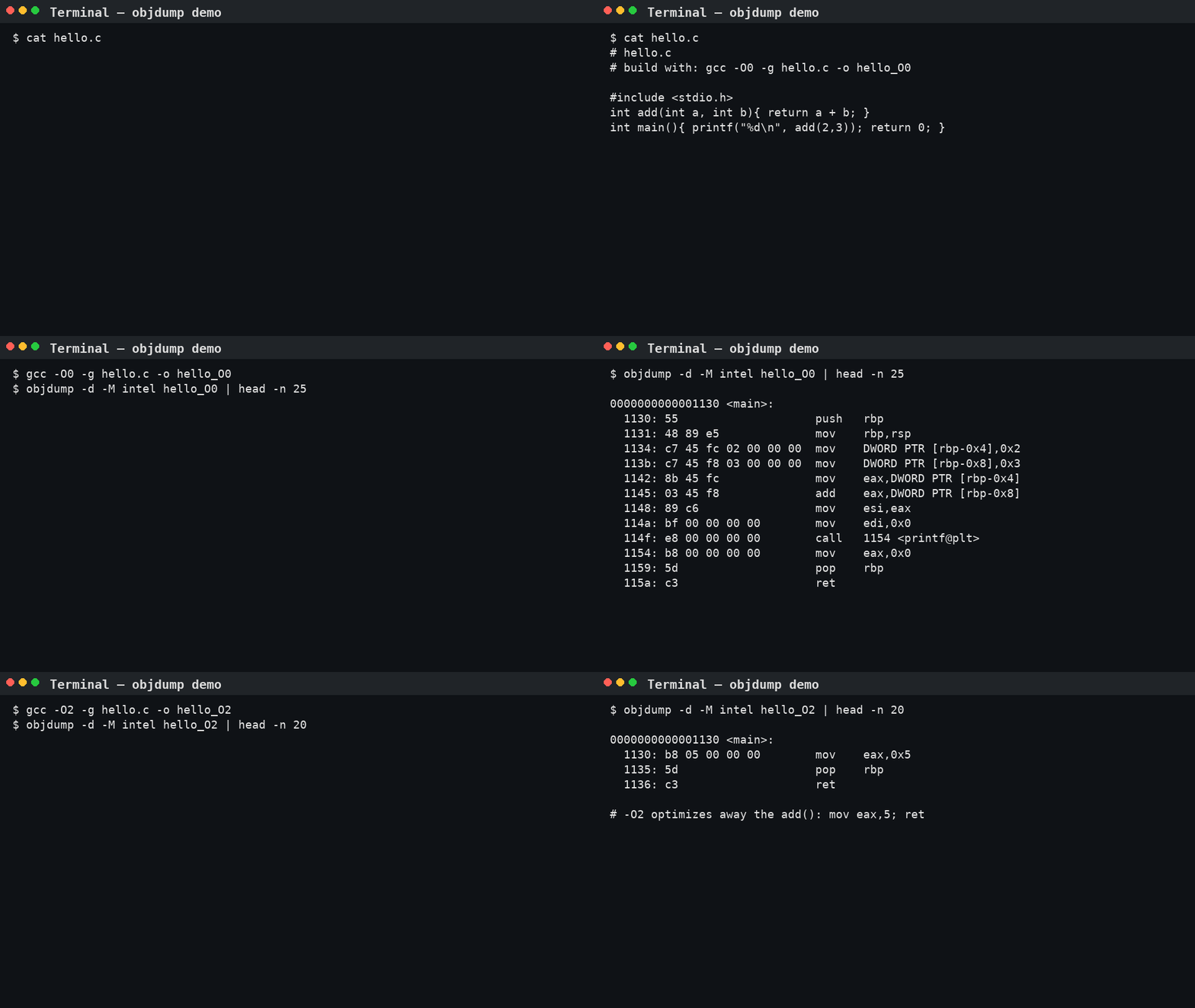
- Compile with
-O0and with-O2; compare generated assembly. - Change
inttounsigned int; observe differences in comparison/branch code. - Trigger overflow intentionally and watch flags/registers in a debugger (
gdb,lldb).
The approach followed at E Lectures reflects both academic depth and easy-to-understand explanations.
People also ask:
A compiler translates high-level code to assembly; an assembler converts that assembly into machine code object files.
Linkers connect your object files with libraries, resolving external names into final addresses and producing a single executable.
A bit is always a single binary digit. A byte is almost universally 8 bits on modern systems; historical exceptions exist but are rare.
Unsigned wraps modulo 2^n. Signed overflow exceeds the two’s-complement range and sets the CPU’s overflow flag; results are often undefined at the language level (e.g., C).
Word size equals the native register width (32/64-bit). It influences address space, integer ranges, performance, and ABI.
Use gcc -E (preprocess), -S (assembly), normal compile for .o, and objdump -d to disassemble the final binary.


