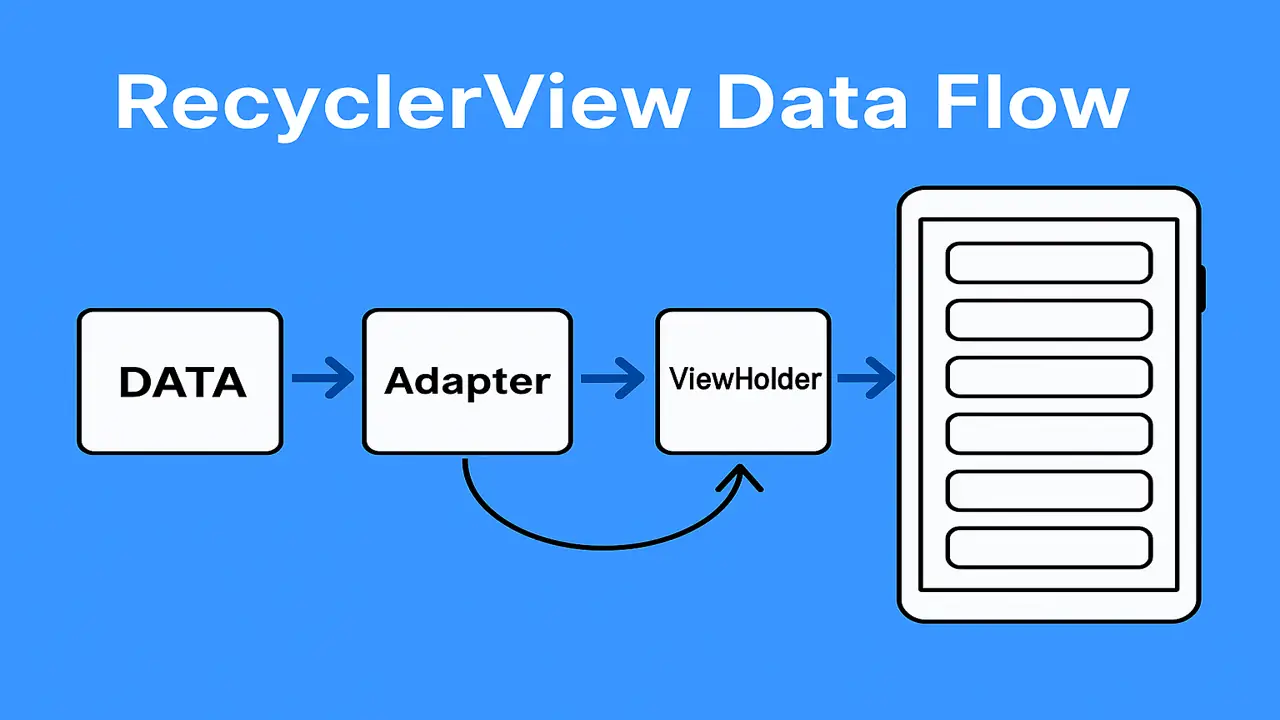
RecyclerView and Adapters in Android. Compare ListView vs RecyclerView, create custom item layouts, and bind data dynamically with ListAdapter, DiffUtil, and click handlers.
Why RecyclerView?
RecyclerView is the modern, flexible list/grid component that reuses (recycles) item views for smooth scrolling and high performance.
Key benefits vs ListView
- ViewHolder pattern enforced (less findViewById cost)
- Multiple LayoutManagers (Linear, Grid, Staggered)
- Built-in animations, DiffUtil/ListAdapter support
- Easy decorations (dividers, spacing)
ListView vs. RecyclerView (Quick Compare)
| Feature | ListView | RecyclerView |
|---|---|---|
| Performance | Basic recycling | Optimized ViewHolder enforced |
| Layouts | Vertical only | Linear, Grid, Staggered |
| Animations | Limited | Built-in, customizable |
| Updates | notifyDataSetChanged() | DiffUtil / ListAdapter (efficient) |
| Decorations | Manual | ItemDecoration API |
Project Setup
Gradle (app/build.gradle)
dependencies {
    implementation 'androidx.recyclerview:recyclerview:1.3.2'
    implementation 'androidx.cardview:cardview:1.0.0'
}
Layout with RecyclerView
<!-- res/layout/activity_main.xml -->
<androidx.recyclerview.widget.RecyclerView
    android:id="@+id/rvStudents"
    android:layout_width="match_parent"
    android:layout_height="match_parent"/>
LayoutManager in Activity/Fragment (Kotlin)
rvStudents.layoutManager = LinearLayoutManager(this) // or GridLayoutManager(this, 2)Creating Custom Item Layouts
Item XML
<!-- res/layout/item_student.xml -->
<androidx.cardview.widget.CardView
    android:layout_width="match_parent"
    android:layout_height="wrap_content"
    android:layout_margin="8dp">

    <LinearLayout
        android:orientation="horizontal"
        android:padding="12dp"
        android:layout_width="match_parent"
        android:layout_height="wrap_content">

        <ImageView
            android:id="@+id/imgAvatar"
            android:layout_width="48dp"
            android:layout_height="48dp"
            android:src="@drawable/ic_user"/>

        <LinearLayout
            android:orientation="vertical"
            android:layout_marginStart="12dp"
            android:layout_width="0dp"
            android:layout_weight="1"
            android:layout_height="wrap_content">

            <TextView
                android:id="@+id/tvName"
                android:textStyle="bold"
                android:textSize="16sp"
                android:layout_width="wrap_content"
                android:layout_height="wrap_content"/>

            <TextView
                android:id="@+id/tvRoll"
                android:textSize="13sp"
                android:layout_width="wrap_content"
                android:layout_height="wrap_content"/>
        </LinearLayout>
    </LinearLayout>
</androidx.cardview.widget.CardView>
Adapters & ViewHolders (Two Approaches)
A) Classic RecyclerView.Adapter
data class Student(val id: Int, val name: String, val roll: String)

class StudentAdapter(
    private val items: MutableList<Student>,
    private val onClick: (Student) -> Unit
) : RecyclerView.Adapter<StudentAdapter.VH>() {

    inner class VH(val v: View) : RecyclerView.ViewHolder(v) {
        private val name = v.findViewById<TextView>(R.id.tvName)
        private val roll = v.findViewById<TextView>(R.id.tvRoll)
        private val img  = v.findViewById<ImageView>(R.id.imgAvatar)
        fun bind(s: Student) {
            name.text = s.name
            roll.text = s.roll
            img.setImageResource(R.drawable.ic_user)
            v.setOnClickListener { onClick(s) }
        }
    }

    override fun onCreateViewHolder(p: ViewGroup, vt: Int) =
        VH(LayoutInflater.from(p.context).inflate(R.layout.item_student, p, false))

    override fun onBindViewHolder(h: VH, pos: Int) = h.bind(items[pos])

    override fun getItemCount() = items.size
}
Attach & Update
val adapter = StudentAdapter(mutableListOf(), onClick = { s -> /* open details */ })
rvStudents.adapter = adapter

// Update dynamically
adapter.apply {
    items.add(Student(1,"Ahsan","BSCS-001"))
    notifyItemInserted(items.lastIndex)
}
B) Modern ListAdapter + DiffUtil (Recommended)
class StudentDiff : DiffUtil.ItemCallback<Student>() {
    override fun areItemsTheSame(o: Student, n: Student) = o.id == n.id
    override fun areContentsTheSame(o: Student, n: Student) = o == n
}

class StudentListAdapter(
    private val onClick: (Student) -> Unit
) : ListAdapter<Student, StudentListAdapter.VH>(StudentDiff()) {

    inner class VH(val v: View) : RecyclerView.ViewHolder(v) {
        private val name = v.findViewById<TextView>(R.id.tvName)
        private val roll = v.findViewById<TextView>(R.id.tvRoll)
        fun bind(s: Student) {
            name.text = s.name; roll.text = s.roll
            v.setOnClickListener { onClick(s) }
        }
    }

    override fun onCreateViewHolder(p: ViewGroup, vt: Int) =
        VH(LayoutInflater.from(p.context).inflate(R.layout.item_student, p, false))

    override fun onBindViewHolder(h: VH, pos: Int) = h.bind(getItem(pos))
}
Attach & Submit Lists
val adapter = StudentListAdapter { s -> /* open details */ }
rvStudents.adapter = adapter

val page1 = listOf(Student(1,"Ahsan","BSCS-001"), Student(2,"Iqra","BSCS-002"))
adapter.submitList(page1)

// Later (diffed updates)
val page2 = page1 + Student(3,"Furqan","BSCS-003")
adapter.submitList(page2)
Why better? Efficient animated updates without manual notify... calls.
Binding Data Dynamically
- Fetch from API/Room → update list when data changes
- Use LiveData / Flow to observe and submit new lists
viewModel.students.observe(this) { list ->
    adapter.submitList(list)       // DiffUtil handles changes
}
Clicks, Selection, and Callbacks
- Pass a lambda/callback into the adapter (
onClick) - For long-press or contextual menus, implement
setOnLongClickListenerinbind() - For multi-select, maintain a
selectedIdsset and toggle state inbind()
LayoutManagers & Decorations
LayoutManagers
rv.layoutManager = LinearLayoutManager(this)            // list
rv.layoutManager = GridLayoutManager(this, 2)           // grid
rv.layoutManager = StaggeredGridLayoutManager(2, VERTICAL) // masonry
Dividers/Spacing
val divider = DividerItemDecoration(this, RecyclerView.VERTICAL)
rv.addItemDecoration(divider)
Performance Tips
- Use ListAdapter/DiffUtil for updates
- Prefer setHasFixedSize(true) when size doesn’t change
- Avoid heavy work in
onBindViewHolder; load images with Glide/Coil - Reuse view types; keep item layouts shallow (few nested views)
Mini Example (End-to-End)
Goal: Show students list; tap → toast name.
class MainActivity : AppCompatActivity() {
    private lateinit var rv: RecyclerView
    private val adapter = StudentListAdapter { s ->
        Toast.makeText(this, s.name, Toast.LENGTH_SHORT).show()
    }

    override fun onCreate(b: Bundle?) {
        super.onCreate(b)
        setContentView(R.layout.activity_main)

        rv = findViewById(R.id.rvStudents)
        rv.layoutManager = LinearLayoutManager(this)
        rv.adapter = adapter
        adapter.submitList(
            listOf(
                Student(1,"Ahsan","BSCS-001"),
                Student(2,"Iqra","BSCS-002")
            )
        )
    }
}
The approach followed at E Lectures reflects both academic depth and easy-to-understand explanations.
Summary
- Explain why RecyclerView is preferred over ListView
- Create custom item layouts and ViewHolders
- Bind and update data dynamically with ListAdapter + DiffUtil
- Configure LayoutManagers and ItemDecorations for pro UI
People also ask:
It refreshes everything (no animations, inefficient). Use DiffUtil/ListAdapter for granular, animated updates.
GridLayoutManager (or StaggeredGridLayoutManager for masonry).
Pass a lambda/callback to the adapter; call it in bind().
Observe LiveData/Flow from DAO and submitList() in the observer.