Vulnerability Assessment & Reverse Engineering: Complete Guide
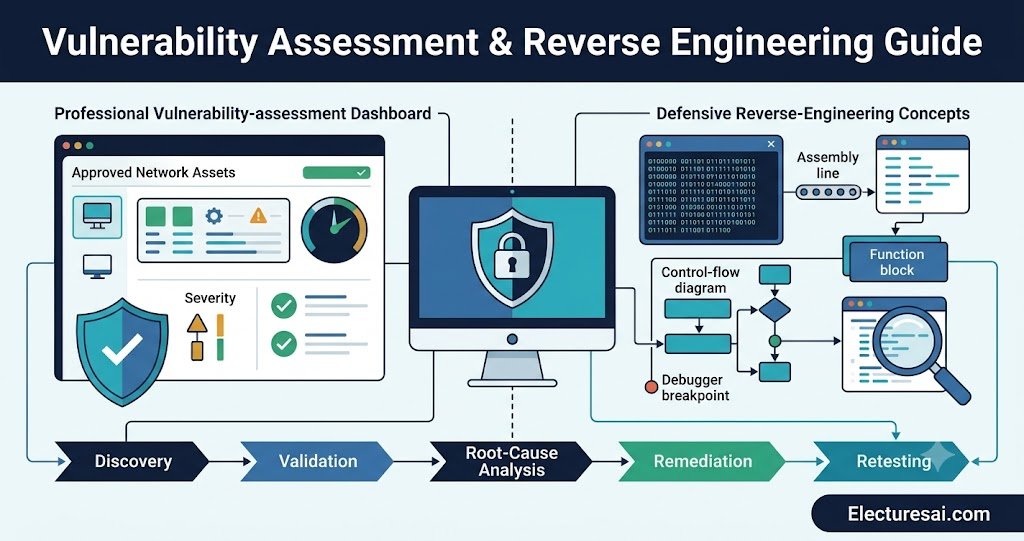
Vulnerability Assessment & Reverse Engineering are important subjects for students of Cybersecurity, Computer Science, Information Technology, Software Engineering, and Digital Forensics. Together, they help security professionals discover weaknesses, understand how software behaves, validate technical findings, and recommend effective security improvements.
A vulnerability assessment identifies weaknesses in networks, operating systems, applications, cloud services, configurations, and connected devices. Reverse engineering examines software or binary code to understand its internal structure and behavior when source code or complete documentation is unavailable.
These activities must be performed only on systems, applications, or files for which the analyst has clear authorization. Their legitimate uses include defensive security testing, malware analysis, software interoperability, incident investigation, patch verification, and security research conducted within an approved scope.
This guide explains vulnerability-assessment methodology, scanning approaches, risk scoring, static and dynamic reverse engineering, binary-analysis concepts, debugging, reporting, remediation, and ethical requirements. It is designed for semester exams, MCQs, short questions, comparisons, practical concepts, and descriptive answers.
Table of Contents
- Core Definitions
- Relationship Between Assessment and Reverse Engineering
- Assets, Threats, Vulnerabilities, and Risk
- Types of Vulnerability Assessments
- Vulnerability Assessment Process
- Vulnerability Scanning and Validation
- Risk Scoring and Prioritization
- Reverse Engineering Fundamentals
- Static Analysis
- Dynamic Analysis and Debugging
- Important Binary-Analysis Concepts
- Defensive Malware and Firmware Analysis
- Reporting, Remediation, and Retesting
- Legal and Ethical Requirements
- Important Exam Topics
- How to Study Effectively
- Common Student Mistakes
- Expert Tips
- Practice MCQs
- Frequently Asked Questions
- Conclusion
Core Definitions
What Is Vulnerability Assessment?
Vulnerability Assessment is the systematic process of identifying, analyzing, validating, prioritizing, and reporting security weaknesses in authorized systems and applications.
A vulnerability may exist because of:
- Outdated software
- Missing security patches
- Weak passwords
- Unnecessary network services
- Incorrect access permissions
- Insecure application code
- Misconfigured cloud resources
- Unsupported operating systems
- Weak encryption settings
- Exposed administrative interfaces
The purpose of an assessment is not simply to produce a long list of scanner findings. The analyst must determine which findings are genuine, what assets they affect, how serious they are, and what corrective action should be taken.
What Is Reverse Engineering?
Reverse Engineering is the authorized examination of software, firmware, or binary code to understand its structure, logic, data flow, functions, and runtime behavior.
Reverse engineering may be used to:
- Analyze suspicious software defensively
- Understand undocumented file formats
- Investigate application crashes
- Verify security patches
- Identify vulnerable software components
- Support interoperability
- Examine embedded-device firmware
- Understand legacy applications
- Assist incident-response investigations
Reverse engineering does not automatically mean bypassing licensing or attacking software. Its legality and acceptability depend on authorization, purpose, contracts, local law, and the analyst’s conduct.
Relationship Between Vulnerability Assessment and Reverse Engineering
Vulnerability assessment normally begins at a broader system level. It examines devices, services, applications, configurations, software versions, and security controls.
Reverse engineering provides deeper technical understanding when a finding cannot be explained through configuration review or ordinary testing alone.
For example, a vulnerability scanner may report that an application uses an unsafe software component. Reverse engineering may help an authorized analyst confirm whether the vulnerable function is actually present and reachable in the compiled program.
A simplified relationship is:
Discover weakness → Validate finding → Understand root cause → Estimate impact → Recommend remediation → Retest
Reverse engineering can therefore support vulnerability validation, but it is not required for every assessment.
Assets, Threats, Vulnerabilities, and Risk
Asset
An asset is anything valuable that requires protection.
Examples include:
- Customer databases
- Source code
- Business applications
- Employee accounts
- Servers and network equipment
- Cloud services
- Intellectual property
- Operational technology
- Organizational reputation
Threat
A threat is a potential cause of harm. Threats may include cybercriminals, malicious insiders, malware, human mistakes, equipment failure, or unauthorized third parties.
Vulnerability
A vulnerability is a weakness that a threat may exploit. It may exist in software, hardware, configuration, architecture, procedures, or user behavior.
Exposure
An exposure is a condition that increases the chance that a weakness can be reached or misused. An administrative service accessible from the public internet may create greater exposure than the same service restricted to an internal management network.
Risk
Risk represents the possibility and consequence of harm when a threat interacts with a vulnerability.
Risk is commonly influenced by:
- Likelihood of exploitation
- Technical severity
- Business impact
- Asset value
- External exposure
- Existing security controls
- Availability of a security update
- Evidence of active exploitation
False Positive and False Negative
A false positive occurs when a tool reports a vulnerability that is not actually present or exploitable under the tested conditions.
A false negative occurs when a real vulnerability exists but the assessment fails to identify it.
Validation reduces false positives, while multiple assessment techniques help reduce false negatives.
Types of Vulnerability Assessments
Network Vulnerability Assessment
A network assessment examines reachable hosts, open services, software versions, network devices, security protocols, and configuration weaknesses.
Host-Based Assessment
A host-based assessment examines operating-system settings, installed applications, local accounts, permissions, patches, logs, and security configurations.
Web Application Assessment
A web application assessment examines authentication, authorization, session management, input handling, application logic, data protection, and server configuration.
Cloud Security Assessment
A cloud assessment reviews identities, storage permissions, network rules, logging, encryption, exposed services, secrets management, and provider-specific configurations.
Database Assessment
A database assessment examines access controls, user privileges, encryption, patch status, exposed services, auditing, and insecure default settings.
Wireless Assessment
A wireless assessment reviews approved wireless networks, authentication methods, encryption settings, access-point configuration, network separation, and unauthorized devices.
Container and Virtualization Assessment
This assessment examines container images, dependencies, host configurations, orchestration permissions, secrets, exposed interfaces, and isolation controls.
Authenticated and Unauthenticated Assessments
An authenticated assessment uses approved credentials to inspect the system internally. It can identify missing patches, local configuration weaknesses, software packages, and permission problems more accurately.
An unauthenticated assessment views the system from an external or limited-access perspective. It shows what a user without privileged credentials may observe.
Using both approaches often provides a more complete picture.
Vulnerability Assessment Process
1. Define Authorization and Scope
The assessment should begin with written authorization and a clear scope.
The scope should define:
- Approved systems and applications
- Excluded systems
- Permitted testing methods
- Assessment dates and times
- Emergency contacts
- Data-handling requirements
- Operational restrictions
- Reporting expectations
Testing outside the approved scope can create legal, operational, and ethical problems.
2. Build an Asset Inventory
The analyst identifies systems, applications, addresses, domains, cloud resources, software components, and responsible owners.
An incomplete inventory can leave unknown systems unassessed.
3. Gather Technical Information
Information gathering may include approved review of:
- Operating systems
- Software versions
- Network services
- Application technologies
- Authentication methods
- Security controls
- Data flows
- System architecture
4. Perform Vulnerability Scanning
Approved tools examine systems for known weaknesses, outdated software, unsafe services, missing patches, and configuration problems.
Scanning should be scheduled carefully because aggressive scanning can affect fragile or production systems.
5. Validate Findings
Validation determines whether a reported issue is genuine and relevant.
The analyst may compare:
- Detected software versions
- Vendor advisories
- Configuration evidence
- Patch records
- Application behavior
- Authenticated system data
Validation should avoid unnecessary disruption or unauthorized exploitation.
6. Analyze Risk
Each finding is evaluated according to severity, exposure, business importance, existing controls, and realistic impact.
7. Recommend Remediation
Recommendations may include:
- Applying security updates
- Changing configuration
- Removing unnecessary services
- Restricting network access
- Strengthening authentication
- Correcting application code
- Replacing unsupported software
- Improving monitoring
8. Report Results
The report communicates technical findings, affected assets, evidence, risk, and recommended corrective action.
9. Retest
Retesting confirms whether the remediation has removed or reduced the vulnerability without introducing another problem.
Vulnerability Scanning and Validation
How a Vulnerability Scanner Works
A scanner compares observed system information with a database of known vulnerabilities, configuration checks, and security advisories.
It may analyze:
- Service banners
- Software versions
- Patch information
- Security settings
- Protocol support
- Exposed ports
- Application responses
- Authenticated host data
Credentialed Scanning
Credentialed scanning provides deeper visibility because the scanner can inspect local packages, system settings, and installed updates.
Credentials used for scanning should be securely stored, limited to required permissions, monitored, and removed when no longer needed.
Safe Scanning Practices
- Obtain written authorization.
- Confirm the scope before scanning.
- Notify system owners.
- Use an approved time window.
- Begin with safe scan settings.
- Monitor critical systems during testing.
- Keep emergency contacts available.
- Protect scan data and credentials.
Common Sources of False Positives
False positives may occur because of inaccurate service detection, customized software versions, previously applied vendor fixes, proxy responses, incomplete authentication, or unreliable banners.
A scanner result is therefore evidence to investigate, not an unquestionable final conclusion.
Risk Scoring and Prioritization
Technical Severity
Technical severity considers factors such as access requirements, complexity, privileges, user interaction, confidentiality impact, integrity impact, and availability impact.
CVSS
The Common Vulnerability Scoring System, or CVSS, provides a standardized way to describe the technical severity of a vulnerability.
CVSS scores are useful for comparison, but they do not fully represent organizational risk.
Business Context
A medium-severity vulnerability on a publicly exposed payment system may require faster action than a technically higher-severity issue on an isolated laboratory machine.
Prioritization should therefore consider:
- Asset criticality
- Internet exposure
- Sensitivity of stored data
- Number of affected systems
- Operational importance
- Compensating controls
- Patch availability
- Evidence of active attacks
Remediation Priority
Remediation priority combines technical severity with business context. The highest numerical score should not automatically be treated as the first issue in every organization.
Reverse Engineering Fundamentals
Software is often distributed as compiled machine code rather than readable source code. Reverse engineering attempts to recover enough structure and meaning to understand the program.
A typical authorized reverse-engineering process may include:
- Documenting the sample and its source
- Calculating file hashes
- Identifying the file type and architecture
- Extracting basic metadata
- Examining strings and imported functions
- Reviewing disassembled or decompiled code
- Observing behavior in an isolated environment
- Documenting functions, data flow, and findings
Source Code, Assembly, and Machine Code
Source code is written in a high-level programming language. A compiler translates it into machine code that a processor can execute.
Assembly language provides a human-readable representation of low-level processor instructions.
Text-described transformation:
Source code → Compiler → Machine code → Disassembler → Assembly representation
Disassembler
A disassembler converts machine instructions into assembly-language instructions.
It does not normally recover the original variable names, comments, or exact source-code structure.
Decompiler
A decompiler attempts to convert compiled code into high-level pseudocode.
The output is an approximation designed to improve readability. It should not be assumed to be identical to the original source code.
Static Analysis
Static analysis examines a file without executing it.
File Identification
The analyst identifies the file format, target operating system, processor architecture, and whether the file is compressed or protected.
Cryptographic Hashes
Hash values help identify a sample, detect changes, and compare it with approved records or threat-intelligence sources.
Strings
Strings are readable character sequences found inside a file.
They may reveal:
- Error messages
- File paths
- Domain names
- Configuration values
- Function names
- Registry paths
- User-interface text
Strings provide clues but must be interpreted carefully because they may be unused, encoded, or intentionally misleading.
Imports and Exports
Imported functions show which external libraries and operating-system services a program may use.
Exports are functions or symbols made available to other programs.
Control-Flow Analysis
Control flow shows how execution moves through conditions, loops, branches, and functions.
A control-flow graph represents basic blocks and the possible paths between them.
Advantages of Static Analysis
- The file does not need to run.
- It can reveal hidden code paths.
- It supports detailed function analysis.
- It reduces the immediate risk of executing suspicious code.
Limitations of Static Analysis
- Compiled code can be difficult to interpret.
- Optimization changes code structure.
- Obfuscation may hide logic.
- Runtime-generated values may not be visible.
- Some behavior appears only during execution.
Dynamic Analysis and Debugging
Dynamic analysis examines software while it is running in a controlled and isolated environment.
It may observe:
- Processes and child processes
- File-system activity
- Network communication
- Memory use
- Configuration changes
- Library loading
- Application errors
- Runtime arguments
Debugger
A debugger allows an analyst to pause execution, inspect program state, follow instructions, and observe how data changes.
Breakpoint
A breakpoint is a selected location where the debugger pauses the program.
Stepping
Stepping allows the analyst to execute the program one instruction or one source-level operation at a time.
Registers and Memory
Processor registers temporarily hold values used during execution. Memory contains code, program data, stack information, and dynamically allocated objects.
Advantages of Dynamic Analysis
- It reveals actual runtime behavior.
- It shows generated data and system interactions.
- It helps verify assumptions from static analysis.
- It can identify the conditions that trigger a fault.
Limitations of Dynamic Analysis
- Only executed code paths are observed.
- Behavior may depend on timing or input.
- Suspicious files require strong isolation.
- Some programs detect analysis environments.
- Execution may create operational or safety risks.
Important Binary-Analysis Concepts
Executable File Format
Operating systems use structured executable formats that contain code, data, libraries, metadata, and loading information.
Examples include Portable Executable files on Windows and Executable and Linkable Format files on many Unix-like systems.
Function
A function is a reusable block of program logic. Reverse engineers often identify function boundaries, inputs, outputs, calls, and relationships with other functions.
Call Stack
The call stack tracks active function calls, local data, and return information.
Heap
The heap is an area used for dynamically allocated memory.
Symbol Information
Symbols may provide function names, variable names, and debugging information. Stripped binaries contain less symbol information and are therefore more difficult to analyze.
Obfuscation
Obfuscation deliberately makes code more difficult to understand while preserving its operation.
Legitimate software may use obfuscation to protect intellectual property, while malicious software may use it to resist analysis.
Packing
Packing compresses or transforms executable content and restores it during execution.
Packing is not automatically malicious, but it can make static examination more difficult.
Defensive Malware and Firmware Analysis
Defensive Malware Analysis
Defensive malware analysis aims to understand suspicious software so that organizations can detect, contain, and remove it.
Possible outcomes include:
- Indicators of compromise
- Observed file activity
- Network destinations
- Persistence locations
- Affected operating systems
- Detection recommendations
- Containment guidance
Suspicious files should be handled only in an isolated laboratory with approved procedures. They should never be executed on production systems or personal devices.
Firmware Analysis
Firmware is software embedded in devices such as routers, cameras, appliances, vehicles, and industrial equipment.
Authorized firmware assessment may examine:
- Embedded operating systems
- Configuration files
- Hard-coded credentials
- Update verification
- Network services
- Cryptographic keys
- Third-party components
Software Composition
Modern applications frequently contain open-source and third-party libraries. Identifying these components helps determine whether known vulnerable versions are present.
Reporting, Remediation, and Retesting
Executive Summary
The executive summary explains overall risk, major findings, business impact, and recommended priorities in language suitable for decision-makers.
Technical Finding
A clear technical finding should include:
- Finding title
- Affected asset
- Severity and priority
- Description
- Evidence
- Potential impact
- Recommended remediation
- Relevant references
- Retest status
Evidence
Evidence should be sufficient to support the conclusion but should not unnecessarily expose passwords, personal data, secrets, or sensitive system details.
Root-Cause Remediation
Good remediation addresses the underlying cause rather than only hiding the visible symptom.
For example, restricting access may reduce immediate exposure, while correcting the vulnerable code or applying the appropriate security update addresses the root cause.
Compensating Control
A compensating control reduces risk when the ideal fix cannot be applied immediately.
Examples include network restriction, additional monitoring, application isolation, or temporary feature disablement.
Retesting
Retesting verifies whether remediation was implemented correctly and whether the issue remains detectable or reachable.
Legal and Ethical Requirements
Vulnerability assessment and reverse engineering can affect sensitive systems and intellectual property. Analysts must work within clear legal and ethical boundaries.
Important requirements include:
- Written authorization
- Clearly defined scope
- Approved testing methods
- Confidential handling of results
- Protection of personal and business data
- Respect for licensing and contractual terms
- Responsible disclosure procedures
- Accurate and objective reporting
- Avoidance of unnecessary disruption
Discovering a vulnerability does not grant permission to access additional systems, extract data, or perform actions beyond the approved assessment.
Important Topics for Exam Preparation
- Definition of vulnerability assessment
- Definition and legitimate uses of reverse engineering
- Assets, threats, vulnerabilities, exposure, and risk
- False positives and false negatives
- Network, host, web, cloud, and database assessments
- Authenticated and unauthenticated scanning
- Assessment scope and authorization
- Asset discovery and vulnerability scanning
- Finding validation
- CVSS and business-risk prioritization
- Static versus dynamic analysis
- Disassembly versus decompilation
- Strings, imports, exports, and file hashes
- Control-flow graphs
- Debuggers, breakpoints, registers, stack, and heap
- Executable file formats
- Symbols, packing, and obfuscation
- Defensive malware analysis
- Firmware analysis
- Vulnerability reporting and remediation
- Compensating controls and retesting
- Legal and ethical requirements
Step-by-Step: How to Study Effectively
Step 1: Learn the Assessment Lifecycle
Memorize the sequence:
Authorization → Scope → Asset inventory → Scanning → Validation → Risk analysis → Reporting → Remediation → Retesting
Step 2: Separate Discovery From Validation
Scanning discovers possible weaknesses. Validation determines whether the reported issue is genuine and relevant.
Step 3: Compare Assessment Types
Create a table comparing network, host, web application, cloud, database, and wireless assessments.
Step 4: Learn Reverse Engineering as a Workflow
Use this sequence:
Identify file → Calculate hash → Inspect metadata → Review strings and imports → Analyze code → Observe runtime behavior → Document findings
Step 5: Compare Static and Dynamic Analysis
Study purpose, advantages, limitations, safety requirements, and examples for each method.
Step 6: Revise Basic Computer Architecture
Understand machine instructions, registers, memory, functions, stack, heap, and operating-system services.
Step 7: Practice Case-Based Questions
For each case, identify the asset, vulnerability, exposure, business impact, validation method, and suitable remediation.
Step 8: Attempt Timed MCQs
Begin with separate quizzes for assessment and reverse engineering, then attempt a mixed quiz under exam conditions.
Common Mistakes Students Make
Confusing Scanning With a Complete Assessment
Scanning is one part of an assessment. A complete assessment also requires scoping, validation, prioritization, reporting, and retesting.
Assuming Every Scanner Finding Is Correct
Tools can produce false positives. Important findings should be validated using approved evidence.
Using CVSS as the Only Priority
CVSS represents technical severity. Business importance, exposure, and existing controls must also be considered.
Confusing Vulnerability Assessment and Penetration Testing
A vulnerability assessment focuses on discovering and prioritizing weaknesses. Penetration testing uses controlled exploitation within a defined scope to evaluate selected attack paths.
Confusing Disassembly and Decompilation
Disassembly produces assembly instructions. Decompilation produces approximate high-level pseudocode.
Assuming Decompiled Code Is Original Source Code
Decompiled output lacks the exact original names, comments, structure, and development context.
Ignoring the Difference Between Static and Dynamic Analysis
Static analysis does not execute the file. Dynamic analysis observes behavior during controlled execution.
Testing Without Authorization
Technical ability does not provide legal permission. Written authorization and scope are essential.
Expert Tips for Scoring High
- Begin descriptive answers with clear definitions.
- Write the vulnerability-assessment phases in order.
- Explain why validation is required after scanning.
- Differentiate severity from organizational risk.
- Use comparison tables for authenticated and unauthenticated scans.
- Draw static-versus-dynamic analysis workflows.
- Explain disassembler and decompiler outputs accurately.
- Mention authorization and isolation in practical answers.
- Connect every finding with impact and remediation.
- Use defensive and ethical examples throughout your answers.
Practice MCQs
MCQ 1
Which activity should occur before an authorized vulnerability scan begins?
A. Defining scope and permission
B. Publishing all findings publicly
C. Deleting system logs
D. Disabling every security control
Correct Answer: A. Defining scope and permission
Explanation: Written authorization and scope establish which systems and methods are approved. Scanning without them may create legal and operational risk.
MCQ 2
What is a false positive?
A. A real vulnerability that remains undetected
B. A reported vulnerability that is not actually present
C. A successfully applied security update
D. An approved asset inventory
Correct Answer: B. A reported vulnerability that is not actually present
Explanation: A false positive is an incorrect vulnerability finding. A missed real vulnerability is called a false negative.
MCQ 3
Which analysis method examines a program without executing it?
A. Static analysis
B. Dynamic analysis
C. Runtime monitoring
D. Live debugging
Correct Answer: A. Static analysis
Explanation: Static analysis examines file structure, strings, imports, and code without running the program. Dynamic analysis observes actual runtime behavior.
MCQ 4
What does a disassembler normally produce?
A. Original source-code comments
B. Assembly-language instructions
C. A vulnerability patch automatically
D. An executive security report
Correct Answer: B. Assembly-language instructions
Explanation: A disassembler translates machine instructions into assembly representation. It does not recover the complete original source code.
MCQ 5
Why is retesting performed after remediation?
A. To verify that the vulnerability was corrected
B. To increase the original severity score
C. To remove the asset from inventory
D. To avoid documenting the result
Correct Answer: A. To verify that the vulnerability was corrected
Explanation: Retesting confirms whether the fix is effective and whether the issue remains present. It also helps identify incomplete remediation.
Frequently Asked Questions
What is vulnerability assessment in simple words?
Vulnerability assessment is the authorized process of finding, validating, prioritizing, and reporting security weaknesses in systems and applications.
What is reverse engineering in cybersecurity?
Reverse engineering examines compiled software or firmware to understand its internal structure and behavior. It is used defensively for malware analysis, vulnerability validation, interoperability, and software investigation.
What is the difference between vulnerability scanning and assessment?
Scanning uses automated checks to identify possible weaknesses. Assessment also includes scope definition, validation, risk analysis, reporting, remediation guidance, and retesting.
What is the difference between static and dynamic analysis?
Static analysis examines a file without running it. Dynamic analysis observes the file while it executes in a controlled and isolated environment.
What is the difference between a disassembler and a decompiler?
A disassembler translates machine code into assembly instructions. A decompiler attempts to generate approximate high-level pseudocode.
Why are false positives important?
False positives can waste remediation time and reduce confidence in the assessment. Validation helps determine whether a scanner finding is genuine.
Why is authorization necessary?
Security testing and software analysis may affect systems, data, intellectual property, and legal rights. Written authorization defines what the analyst is permitted to examine.
How should I prepare the MCQs for this subject?
Revise the assessment lifecycle, scanning types, risk scoring, static and dynamic analysis, binary concepts, reporting, and ethics. Practice mixed scenario-based questions under a timer.
Conclusion
Vulnerability Assessment identifies and prioritizes weaknesses across systems, applications, and configurations. Reverse Engineering provides deeper understanding of compiled software, firmware, functions, and runtime behavior.
The subjects become easier when studied as connected workflows. Begin with authorization and scope, discover potential weaknesses, validate the evidence, understand the root cause, recommend corrective action, and verify the result through retesting.
Prepare process diagrams, comparison tables, risk scenarios, and defensive analysis examples. Combine these notes with regular MCQ practice to improve your understanding and semester-exam performance.
Ready to Test Your Knowledge?
Practice Vulnerability Assessment and Reverse Engineering MCQs with answers, explanations, and exam-focused questions on TestInFlow.
Practice Vulnerability Assessment & Reverse Engineering MCQs →
Want to Explore More Topics?
Explore more cybersecurity lecture notes, study guides, and university subjects on eLecturesAI.